

Most tour operators don't have a "privacy problem." They have a data sprawl problem that eventually turns into a privacy problem when something goes wrong.
Think about what gets collected across a single booking. A name and email at inquiry. Passport numbers for a border crossing. A dietary note mentioning a nut allergy. A medical form for a scuba add-on. A signed liability waiver. Emergency contact details. Then all of that gets forwarded — to a hotel, a local guide, an insurance broker, a transport supplier. By the time the guest is on the bus, their personal information lives in six inboxes, two spreadsheets, a WhatsApp thread, and a booking system nobody remembers to clean out.
That's the real shape of the problem. Governance isn't about writing a privacy policy nobody reads. It's about knowing, field by field, what you hold, why you hold it, who you shared it with, and when it's supposed to disappear. That's what serious data governance for a tour operator actually looks like — and almost nobody builds it until an incident forces the issue.
This piece walks through the parts that break most often: how consent timing gets confused, why retention becomes impossible without a calendar, and what an incident actually looks like when medical notes and waivers are involved.
Not all PII is equal — classify by field, not by document
The first mistake is treating "personal data" as one bucket. A booking form isn't a single thing you either protect or don't. It's a collection of fields, each with a completely different risk level, legal basis, and shelf life.
A guest's first name sitting in a confirmation email is low-stakes. That same guest's passport scan, health condition, or emergency contact is a different category entirely — and in most privacy frameworks, health data is "special category," meaning the rules are stricter and the penalties for mishandling it are worse.
When you classify at the document level, you end up over-protecting harmless stuff and under-protecting the dangerous stuff. The passport scan and the marketing preference get filed in the same folder, treated the same way, deleted at the same time (or never). Field-level classification fixes that by forcing you to answer three questions per field: how sensitive is it, why do we have it, and how long do we genuinely need it.
Here's a practical starting map:
| Field | Sensitivity | Why you hold it (basis) | Realistic retention |
|---|---|---|---|
| Name / email / phone | Low | Contract + marketing (if consented) | Life of relationship, then archive |
| Billing / card token | Medium | Contract / payment | Per payment processor + tax rules |
| Passport / ID number | High | Legal / border requirement | Delete shortly after trip completes |
| Dietary notes | Medium (can reveal health/religion) | Operational delivery | Delete after trip |
| Medical / fitness forms | Very high (special category) | Explicit consent / safety | Short window post-trip, then purge |
| Signed waiver | High | Legal defence | Multi-year (limitation period) |
| Emergency contact | High (third-party data) | Vital interest / safety | Delete shortly after trip |
Notice the pattern in that last column. A waiver you might keep for years because it protects you if someone sues. A medical note you should delete almost immediately after the trip — keeping it "just in case" is the liability, not the protection. Most operators do the opposite: they keep the medical form forever and forget where the waiver went.
Retention isn't one policy. It's a per-field decision, and the "keep everything" default is the most expensive setting you can run.
Consent timing: the marketing vs operations mix-up
This is where a lot of operators quietly break the rules without realizing it.
Never miss a booking or update.
Touryly streamlines your travel bookings, confirmations, and itinerary updates—all in one place.
- Unified booking management
- Automated customer notifications
- Itinerary & staff coordination
No credit card required
When someone books a trip, you don't need their consent to email them their itinerary, send a pickup time, or share their passport number with the border agent. That's operational — you need it to deliver the service they paid for. The legal basis is the contract itself, not consent.
Marketing is a completely separate thing. "Can we email you about next season's tours?" is a consent question, and it has to be asked separately, opt-in, with a clear way to say no. The problem is that these two get blended into one checkbox at checkout — usually a pre-ticked box that says something like "I agree to receive updates." That single box is doing two jobs and failing at the compliant one.
In real operations, this usually happens because the booking form was built by whoever set up the website, not by anyone thinking about legal basis. The result is a database where you genuinely can't tell who opted into marketing and who just wanted their tickets. So when you send the spring newsletter, you're emailing people who never agreed — and every one of those is a complaint waiting to happen.
A cleaner approach separates the timing:
-
At booking collect only what you need to deliver the trip. No marketing ask buried in the terms.
-
After the checkout is complete ask the marketing question on its own, opt-in, clearly worded.
-
Store the answer as a dated record, not just a yes/no flag — you want to know when consent was given and through which form.
That last point matters more than it looks. If someone challenges whether they agreed to marketing, "the box was ticked" isn't proof. A timestamped record of what they saw and when is. Plenty of small operators can produce the booking but not the consent trail — and that gap is exactly what gets scrutinized.
Supplier sharing: the leak you authorize on purpose
Your biggest data exposure usually isn't a hacker. It's the forwarding.
To run a trip, you have to share guest data with suppliers — the hotel needs names, the dive operator needs the medical form, the transport company needs the pickup list. Every one of those hand-offs is a transfer of personal data, and once it leaves your system you've lost direct control over it. If your local supplier keeps guest passport scans in an unsecured inbox for three years, that's still partly your problem, because you're the one who collected the data and chose that supplier.
The pattern that breaks at scale is predictable. When you're running 40 trips a year, you know your suppliers personally and the sharing feels informal and safe. At 400 trips across a dozen destinations, you're forwarding sensitive data to people you've never met, over channels you don't control, with no record of what was sent or whether it was ever deleted.
A few things separate operators who handle this well from those who don't:
-
They share the minimum. The hotel doesn't need the medical form. The dive operator doesn't need billing details. Strip each hand-off to only the fields that supplier actually requires.
-
They keep a sharing log — who received what, when, for which trip. When a guest asks "who has my data," you can answer in minutes instead of guessing.
-
They put deletion obligations in the supplier agreement, the same way you'd handle penalty triggers or substitution terms in any other supplier relationship.
-
They avoid open channels for sensitive fields. A medical note in a WhatsApp group is a note you no longer control.
Keep a sharing log that ties each field to the recipient, the date, and the stated purpose — it cuts scoping time during incidents.
The mistake almost everyone makes early on is treating supplier sharing as a communication task instead of a data event. It's both. The message gets sent; the liability stays with you.
Retention calendars: why "we'll clean it up later" never happens
Retention is the part that sounds boring and turns out to be the most operationally useful.
The reason data never gets deleted isn't laziness — it's that deletion has no trigger. Bookings have triggers everywhere: a deposit is due, a supplier needs confirming, a guide needs a roster. Deletion has none. So the passport scans from three summers ago just sit there, accumulating, until they're either forgotten or exposed.
A retention calendar fixes this by attaching a deletion date to each category at the moment of collection, tied to a trip event rather than a vague timeframe. The event is usually "trip completion date," and everything counts forward from there.
A workable retention flow reads like this:
-
Trip completes. This is your anchor event — the clock starts here for most fields.
-
Within a short window (days, not months) purge operational-only sensitive data — dietary notes, emergency contacts, any temporary medical or fitness forms. The trip is over; you don't need them.
-
Passport / ID data delete once any legal reason to hold it has passed. For most operators that's shortly after the trip, unless a specific regulation says otherwise.
-
Billing records retain per your tax and payment-processor obligations — this is usually several years, and it's genuinely required, so it's the one place "keep it" is correct.
-
Signed waivers retain through the legal limitation period for injury claims in the relevant jurisdiction, then delete.
-
Marketing data keep only while the person is still an active, consented contact; drop them after a defined period of no engagement and re-confirm consent periodically.
Visual workflow of the retention calendar:
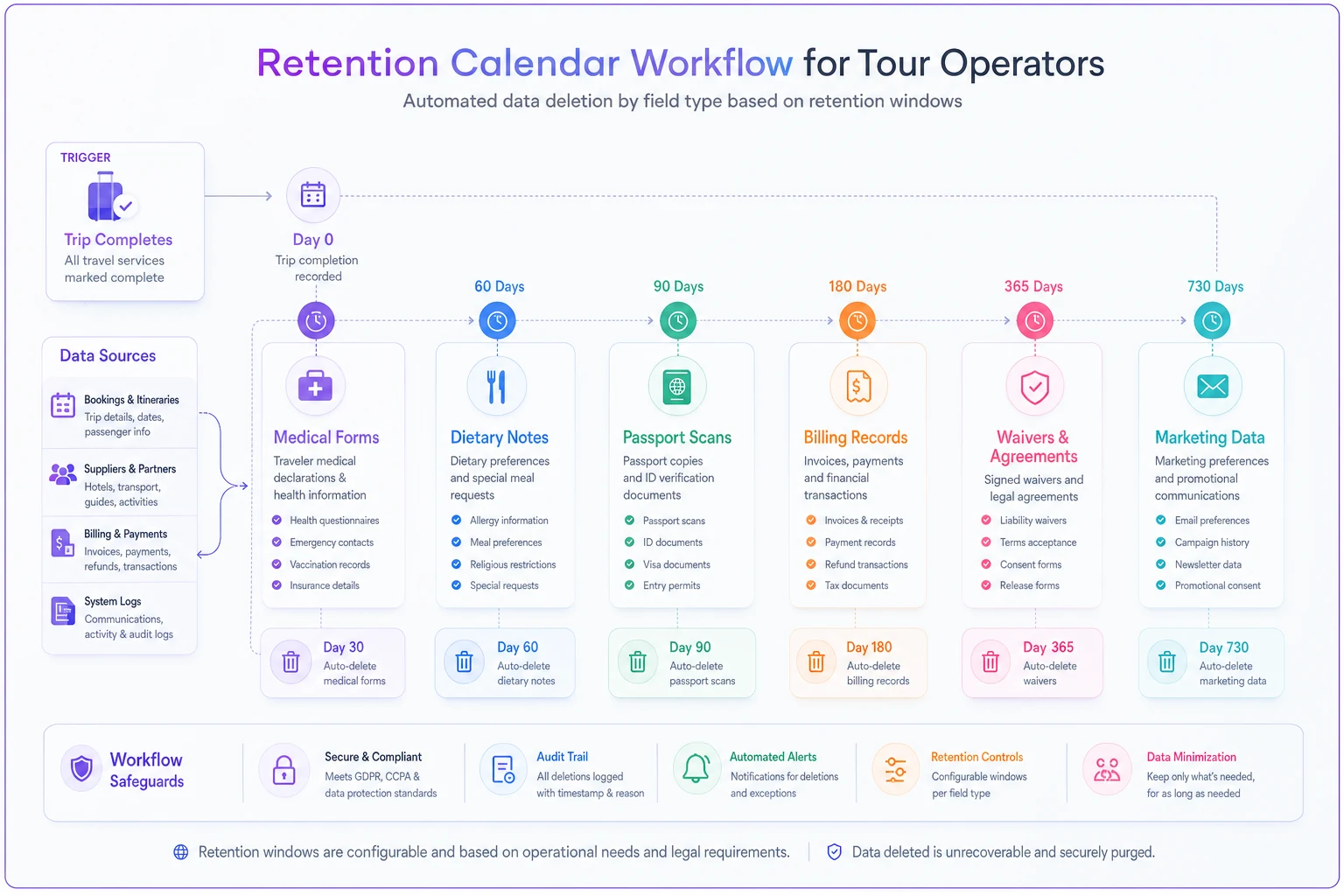
The thing buried in that list: different fields from the same booking leave at completely different times. The dietary note is gone in a week. The waiver stays for years. If your system deletes bookings as one lump, you're either destroying records you legally need or keeping data you should have purged. Neither is fine.
This is also where a solid underlying data structure pays off. If your booking and settlement information already lives in one clean place rather than scattered across tools — the kind of setup described in why a minimum viable booking→settlement data stack fixes margin leakage — then attaching retention rules to records is straightforward. If it's scattered across inboxes and spreadsheets, retention is basically impossible, because you can't delete what you can't find.
Incident‑response playbook: what to actually do when it goes wrong
An incident isn't always a dramatic breach. More often it's mundane: a staff laptop with the guest list left on a train, a group email that CC'd everyone instead of BCC, a supplier who got hacked and had your medical forms sitting in their system.
The operators who handle incidents badly aren't the ones who had the incident — everyone eventually has one. They're the ones who improvise under pressure, miss the notification deadline, and can't reconstruct what was exposed. A playbook removes the improvisation.
A tour-specific incident response should cover:
-
Detect and contain first. Cut the access, revoke the shared link, recall the email if you can. Stop it getting worse before you do anything else.
-
Scope what was exposed — by field, not by "a spreadsheet." "The dietary column and around 40 passport numbers" is a real assessment. "Some customer data" is not, and it's the difference between a manageable notification and a panic.
-
Check the clock. Many privacy regimes require notifying the regulator within a tight window (often around 72 hours) once you're aware of a qualifying breach. That clock starts whether or not you're ready.
-
Decide on individual notification. High-risk exposures — passports, medical notes — usually require telling the affected guests directly. Have a template ready so you're not drafting it at 11pm.
-
Log everything. What happened, when you found out, what you did, who you told. Even breaches you don't have to report should be recorded.
-
Run a post-incident review. Close the specific gap that caused it — the open channel, the missing access control, the supplier without a deletion clause.
The field-level classification you did earlier is what makes scoping fast. If you already know which fields are high-sensitivity and where they live, assessing a breach is a lookup, not an archaeology dig. Operators who skipped classification spend the first day of an incident just trying to figure out what they actually lost — and that's exactly the day the clock is running on.
There's a useful overlap here with fraud handling too. The same instinct that helps you read booking signals that predict fraud — treating unusual access patterns as signals worth investigating — applies to spotting data incidents early rather than finding out from an angry customer.
A real scenario: the medical form that lingered
A small adventure operator running roughly 250–300 trips a year offered a canyoning add-on that required a health declaration. Each guest filled one out. Nobody ever deleted them.
Two and a half years in, the shared drive holding those forms was accessed through a reused staff password. Around 600–700 health declarations were exposed — the exact figure was hard to pin down at first, because the forms were spread across folders named by trip, by month, and by guide, with duplicates everywhere.
The exposure itself was bad. The bigger cost was the scramble. It took the better part of a week just to establish who was affected, because there was no field-level inventory and no retention calendar — forms from trips completed two years earlier were sitting right next to current ones. Most of that data should have been purged within weeks of each trip finishing. Had a retention calendar been in place, the breach would have touched a season's worth of forms at most, not two and a half years of accumulation.
After the cleanup, the operator changed two things. Health forms got a hard deletion window tied to trip completion, and supplier sharing moved off email onto a controlled hand-off with a log. The volume of sensitive data they held at any given time dropped significantly — and the next time a minor incident happened, scoping it took an afternoon instead of a week.
The lesson isn't "breaches are scary." It's that the size of your incident is decided long before it happens, by how much you were needlessly holding.
When tight governance makes sense — and when you're overdoing it
This level of governance genuinely makes sense when:
-
You collect special-category data — medical, health, disability info — for any activity.
-
You share guest data with suppliers across borders.
-
You're past the point where one person knows where everything lives.
-
You handle passports or government IDs as a routine part of trips.
You're probably over-engineering when:
-
You're a tiny operator running a handful of low-risk day tours, no medical data, minimal supplier sharing — and you've built a 40-page policy nobody reads instead of just deleting old data on a schedule.
-
You're writing procedures for data you don't actually collect.
Who should not just wing it: anyone running medical waivers, anyone forwarding sensitive fields to third-party suppliers, and anyone scaling past the point where informal memory covers what's stored where. That's where the informal approach silently fails, usually right before the incident that reveals it.
Pulling it together
Governance for tour operators isn't a legal chore bolted onto the business. It's an operational discipline that runs on the same logic as everything else you manage: know what you have, know why, know who touched it, and know when it leaves.
The through-line across all of this is minimize. Collect fewer fields. Share fewer fields. Keep them for shorter periods. Every piece of PII you're not holding is a piece that can't leak, can't be requested in a subject access, and can't turn a small incident into a large one. The operators who sleep well aren't the ones with the fanciest security — they're the ones who simply don't hoard data they no longer need.
Start with the field-level map. Attach a retention date to each category. Separate your marketing consent from your operational necessity. Log your supplier sharing. Write the incident playbook before you need it. None of it is glamorous, and all of it quietly protects the business you spent years building.
Ready to elevate your travel business?
Join 500+ travel operators using Touryly to optimize bookings, improve client satisfaction, and grow revenue.