

Tour guides carry about seventeen things in their pockets during peak season. Phone, backup battery pack, first aid supplies, printed vouchers (because someone's QR code never works), emergency contact cards, and that crumpled napkin with the allergic guest's medication names scribbled on it from breakfast.
Managing guides across multiple locations hits differently when you're not there. A guide dealing with a medical emergency at Machu Picchu can't flip through a binder. Another guide navigating an aggressive vendor in Bangkok's floating market needs documentation steps they can follow one-handed while de-escalating. Your guide coordinating a lost passport situation in Rome needs evidence capture that holds up when the travel insurance company challenges the claim four months later.
Most tour operators build their mobile field operations checklist after something goes wrong. Usually after losing a dispute because the guide's handwritten notes didn't include GPS coordinates. Or after a shift handover missed critical medical information about a guest. The scramble to create mobile-first documentation happens when you realize paper forms don't work at 14,000 feet in the rain.
Why standard incident forms fall apart in the field
Traditional incident management assumes your guide has a desk, decent lighting, and twenty minutes to fill out a form. Reality looks more like this: your guide is managing a guest injury while standing in ankle-deep water during a cave tour, typing with one thumb while holding a flashlight with the other, trying to capture exact timestamps before the phone battery dies.
The breakdown usually comes from three compounding failures.
First, forms designed for desktop become navigation nightmares on a wet phone screen. Dropdown menus that work fine on a laptop, multi-page forms that lose data when the connection drops between cell towers, required fields that can't be skipped and force guides to enter placeholder data - corrupting the entire record.
Second, evidence capture gets treated as an afterthought instead of the primary defense against disputes. Guides take photos but forget to enable location services. They capture the injury but not the surrounding hazard. They document the damaged property but not what led up to it. When the chargeback comes three months later, the one piece of evidence that would've won it is missing.
Third, handover protocols assume perfect conditions. Morning guide tells the afternoon guide about the difficult guest but doesn't document the specific trigger behaviors. Medical information gets passed verbally without written backup. Special requests get mentioned in passing and never make it into the operational record. By day three of a multi-day tour, critical details have morphed through multiple retellings.
The costs go beyond lost disputes. Insurance claims get denied because timestamps don't match. Guest complaints escalate because response protocols weren't followed. Guides burn out faster when they feel unsupported in difficult situations.
Building mobile triage steps that actually work
Effective mobile triage starts with the physical reality of field operations. Your guide might be dealing with altitude, weather, crowds, language barriers, and limited connectivity all at the same time. The checklist needs to work when everything else is failing.
Never miss a booking or update.
Touryly streamlines your travel bookings, confirmations, and itinerary updates—all in one place.
- Unified booking management
- Automated customer notifications
- Itinerary & staff coordination
No credit card required
The 60-second initial capture protocol:
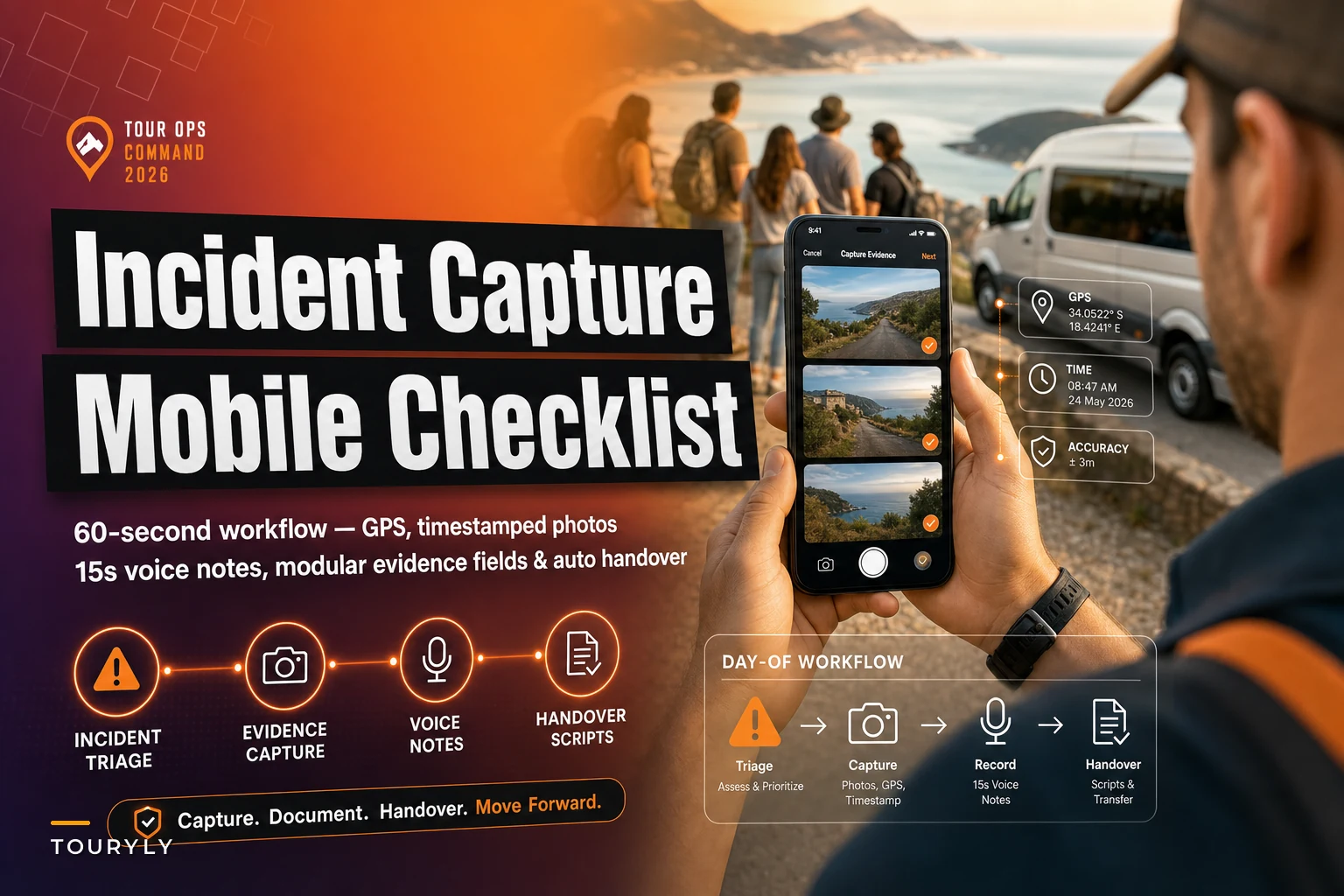
Start with GPS coordinates and timestamp - these happen automatically if configured correctly. The guide opens the incident form, location services capture exact position before anything else. No manual entry, no searching for addresses.
Next: three photos minimum. Wide shot showing context and surroundings. Medium shot showing the specific situation. Close-up showing relevant details. Each photo gets timestamped and geotagged automatically. The guide doesn't need to remember which photo was taken when or where.
Then a 15-second voice note describing what's happening. Not a formal report - just quick verbal documentation while the situation is fresh. "Guest slipped on wet stones near the waterfall, appears to be ankle injury, conscious and alert, beginning first aid protocol." Voice capture works when typing doesn't.
The expandable detail layers:
After initial capture, the system presents expandable sections based on incident type. Medical situation? Allergy fields and emergency contact options surface. Property damage? Evidence fields for serial numbers and purchase dates appear. Guest conflict? De-escalation steps and witness information sections expand.
Each section works as a standalone module. Connection drops after completing section two? That data is already saved. Guide gets interrupted and comes back twenty minutes later? They pick up exactly where they left off.
The system pre-fills known information from booking records - guest name, tour details, emergency contacts. The guide focuses on capturing what's unique to this situation, not re-entering data that already exists.
The handover script generator:
Shift changes need more than verbal updates. The mobile system generates handover scripts based on the day's incidents and ongoing situations - not generic templates, but specific scripts built from actual field data.
Morning guide documents a guest's vertigo issues during the mountain tour. The system generates: "Guest Patricia Chen, booking #4782, experienced mild vertigo at 2,800m elevation at 09:45. Rested for 20 minutes, symptoms resolved. Monitor during afternoon ascent to 3,200m. Guest carrying prescription meclizine, last dose at 08:00."
The afternoon guide receives this as both text and audio, acknowledges receipt with one tap, and has full context without a lengthy verbal briefing that might miss something critical.
A quick visual of the 60-second capture and handover workflow can make training simpler.
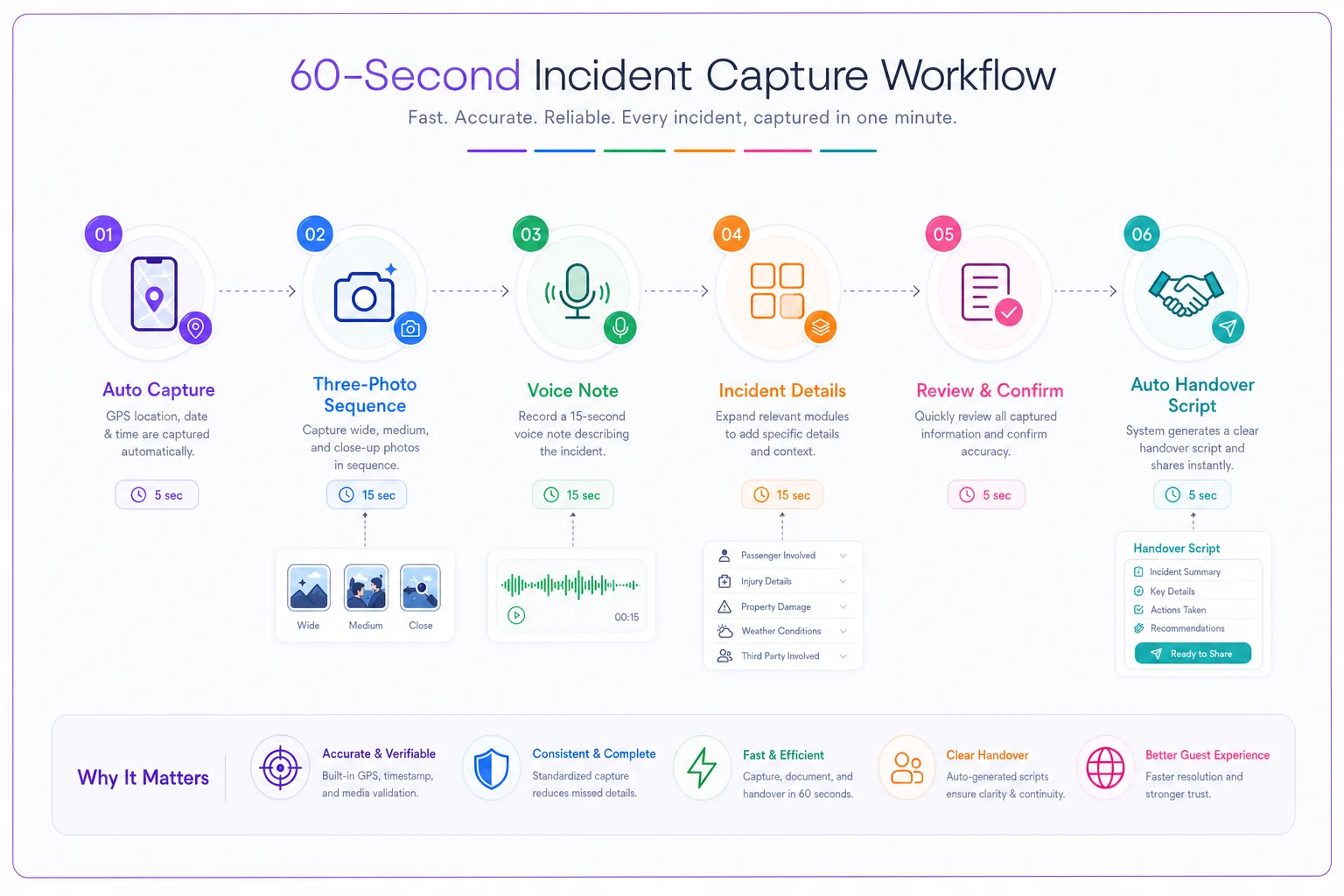
Use the visual as a training aid so guides can practice the steps until they become second nature.
Evidence templates that survive dispute challenges
Insurance companies and payment processors don't care about your guide's good intentions. They care about timestamped, geotagged, sequenced evidence that tells a clear story. The difference between winning and losing a $15,000 chargeback often comes down to photo metadata.
The photo sequence protocol:
Every incident needs establishment shots before detail shots. Wide photo showing the tour group's location and general conditions. Environmental photo showing specific hazards - wet floor, broken railing, aggressive animal. Incident photo showing the actual situation. Follow-up photos showing resolution attempts.
Each photo automatically embeds EXIF data that can't be edited later - timestamp, GPS coordinates, device identifier, even compass heading. When a guest claims they were somewhere else when the incident happened, your evidence says otherwise.
The template also forces comparison shots. Photo of the "dangerous path" the guest claims was unmarked? Include a shot of the three warning signs they walked past. Guest says their luggage was pristine before the tour? Capture existing damage during morning pickup.
The witness documentation framework:
Third-party witness statements carry more weight than staff reports alone. Getting useful witness information in the field requires structure. The mobile system presents quick-capture witness forms that prioritize contact information first, detailed statements second.
A witness sees the incident and scans a QR code on the guide's phone, enters their contact details, and can provide a full statement later when they have time. The system captures their initial agreement to provide testimony, even if the full statement comes days later.
For immediate statements, the witness can use voice recording in their preferred language. The system transcribes and translates, keeping both the original audio and the translation for legal purposes. No need for the guide to struggle with handwritten statements in a language they don't fully understand.
Coordination when multiple guides share groups
Large group tours split across multiple guides create real coordination problems. Lead guide handles registration while the sweep guide manages stragglers. Local specialist provides commentary while the operations guide handles logistics. Without clear protocols, critical information falls through the gaps.
The zone responsibility matrix:
Each guide gets assigned specific zones of responsibility on their mobile checklist. Not vague tasks like "help with crowd control" but specific ones: "Monitor guests 15-22 for bathroom breaks," "Track dietary restrictions for lunch service," "Document any infrastructure issues at stops 3, 5, and 7."
When an incident occurs, the system identifies which guide has primary responsibility based on zone assignments automatically. Medical emergency with guest 18? The guide monitoring guests 15-22 gets the primary alert. Infrastructure problem at stop 5? The guide assigned to document that stop receives the escalation.
The cascade notification system:
Not every guide needs every alert. The system triggers notifications based on role and proximity. Guest injury? Primary guide gets immediate alert, sweep guide gets standby notification, office gets a summary report. Payment dispute at a local vendor? Operations guide gets primary alert, lead guide gets an awareness notification.
Each notification includes response requirements. Primary alert means stop everything and respond. Standby means be ready to assist if escalated. Awareness means note it for handover and continue current tasks.
| Alert Type | Recipient | Required Action |
|---|---|---|
| Primary | Responsible guide | Stop current task, respond immediately |
| Standby | Backup guide | Be ready to assist if escalated |
| Awareness | Lead guide | Note for handover, continue current tasks |
| Summary | Office | Log incident, monitor for escalation |
Unified guest profile updates:
When one guide updates guest information, every guide sees it immediately. Morning guide notes that a guest has motion sickness on the boat? Afternoon guide sees the flag before the bus ride. Lunch guide discovers a severe nut allergy not in the booking? Dinner guide gets an automatic alert about kitchen requirements.
Updates sync even in low-connectivity environments. The system queues changes locally and pushes them when connection improves. Guides don't need perfect cell service to maintain coordinated guest profiles.
Real-time adjustments when plans fall apart
No tour survives first contact with reality intact. The museum closes unexpectedly. The restaurant loses power. The scenic viewpoint gets shut down by authorities. Your mobile checklist needs to handle dynamic adjustments without creating chaos.
The decision tree navigator:
Instead of leaving guides to figure out alternatives alone, the system presents decision trees based on the current situation. Museum closed? It shows pre-approved alternatives ranked by distance, already-confirmed availability, and guest profile fit - families with kids get different options than photography groups.
Each alternative includes required adjustments: "If switching to Backup Option B, notify transport to arrive 30 minutes later, confirm lunch can accommodate early arrival, check if any guests have mobility issues for extra stairs."
The guide selects an option and the system triggers coordinated updates. Transportation gets a revised pickup time. The restaurant gets an updated headcount and arrival estimate. The office gets an incident report for customer service follow-up.
Escalation triggers:
Some situations need immediate management involvement. The mobile system recognizes escalation triggers and automatically loops in support. Guest threatening legal action? Immediate notification to legal compliance. Medical emergency requiring evacuation? Direct line to emergency coordinator. Missing guest at departure time? Automatic protocol activation.
Escalation doesn't mean the guide stops working. They continue following their checklist while management handles parallel processes - the guide stays focused on guest safety while the office handles insurance notifications and family contact.
Tech stack reality for mobile field operations
Building effective mobile operations means accepting technical constraints upfront. Guides work in places with unreliable internet, extreme weather, and limited battery life. The tech stack needs to survive those conditions, not just perform well in a demo.
Offline-first architecture:
Everything critical must work without internet. Initial incident capture, photo documentation, triage checklists - all functional in airplane mode. The system saves locally and syncs when connectivity returns.
Offline-first doesn't mean isolated, though. The system maintains the last known good state of critical data. Guest medical information, emergency contacts, scheduled stops - all cached locally and updated when possible. Guides always have access to essential information, even in dead zones.
Battery optimization:
A dead phone helps nobody. The system aggressively manages battery consumption. Background GPS runs only during active incidents. Photo compression happens during charging, not in the field. Automatic sync waits for WiFi when possible.
Test battery-saving shortcuts in the field during peak days to confirm they actually reduce drain.
The system also includes power-saving shortcuts: one-tap incident start that activates all necessary sensors, quick-capture modes that minimize screen time, voice-first input options that work with the screen off.
Cross-device handoff:
Guides' phones break. They get dropped in rivers, stepped on, stolen by monkeys - that last one actually happens more than you'd expect. The system needs seamless device switching.
QR code login gets a replacement device operational in seconds. All local data backs up to cloud continuously. Incident documentation can start on one device and finish on another. The guide who dropped their phone in the cenote can borrow another guide's device and keep working immediately.
The compound benefits of structured mobile operations
Better incident handling is just the starting point. The improvements ripple across the entire business.
Guest satisfaction improves because problems get resolved faster. When guides can access real solutions instead of making promises they hope the office can keep, guests feel supported. The family dealing with food poisoning gets immediate medical protocol activation, not "we'll sort this out when we get back."
Guide retention increases when staff feels equipped for difficult situations. Nobody likes feeling abandoned when things go sideways. Mobile checklists that actually work give guides confidence to handle problems professionally - they know exactly what to document, who to contact, and what steps to follow.
Insurance premiums can decrease with better documentation. After a year of properly documented incidents with photo evidence and witness statements, operators have real leverage in rate negotiations. Insurance companies prefer operators who can demonstrate that their risk management actually works.
Dispute resolution improves significantly when you have proper evidence. That chargeback claiming the tour never happened? Here's timestamped photos of the guest at seven different stops. The complaint about unsafe conditions? Here's video of the safety briefing they attended.
Training new guides becomes more consistent too. Mobile checklists provide the same protocols regardless of who's training whom. New guides learn the right way from day one, not whatever shortcuts their training guide developed over time.
Converting from paper to mobile operations
The transition from clipboard-and-paper to mobile operations doesn't happen overnight. Most operators fail by trying to digitize everything at once. Guides revolt, the system crashes, everyone goes back to paper within a week.
-
Start with highest-risk scenarios only - medical emergencies and serious property damage. The situations where proper documentation prevents lawsuits. Get guides comfortable with mobile protocols when the stakes are high and the benefits are obvious.
-
Build from success, not mandates. When Guide A wins a dispute because they had proper photo evidence, Guide B starts taking photos properly too. When Guide C avoids a medical crisis because the mobile system had allergy information, Guide D starts trusting the system.
-
Phase features based on field feedback. Guides say the photo upload takes too long? Fix that before adding video capability. They want voice notes in Spanish? Build that before adding Portuguese. Let operational reality drive development priorities.
-
Accept that paper won't disappear completely. Some guides will always carry backup forms. Some situations legitimately work better with physical documents. The goal isn't pure digital operations - it's having mobile tools that work when needed.
Most operators who rush a full rollout regret it. The ones who phase it properly end up with guides who actually defend the system.
Building your mobile-first evidence framework
Evidence capture can't be an afterthought. It needs integration from booking through post-tour follow-up. The framework starts before guides ever open the mobile app.
During booking, collect specific consent for photo documentation. Not buried in terms and conditions - explicit acknowledgment that tours include photo evidence for safety and quality assurance. This prevents later claims that guests didn't consent to being photographed during incidents.
Pre-tour, establish evidence baselines. Guides photograph pre-existing damage, medical equipment, special accommodations. When a guest later claims you damaged their $3,000 camera, you have date-stamped proof of existing damage.
During tours, evidence capture should feel routine rather than exceptional. Regular checkpoint photos, standard safety briefing recordings, condition documentation at stops. When evidence capture is constant, it doesn't feel targeted or accusatory during actual incidents.
Post-tour, organization determines accessibility. Proper categorization and tagging makes finding specific evidence months later feasible. The photo that saves you from a lawsuit is worthless if nobody can locate it when needed.
AI-powered operational software can take this framework from manual drudgery to automated protection - smart photo categorization, automatic evidence compilation for disputes, intelligent retention policies that balance storage costs with legal requirements. The operational overhead drops while protection coverage improves.
Making mobile operations sustainable long-term
Mobile field operations only work if guides actually use them consistently. The best checklist in the world fails if it stays unopened on phones.
Regular audits reveal usage patterns. Which guides consistently skip certain sections? Which checkpoints never get photographed? Which handover scripts get ignored? The patterns show where the system fights operational reality instead of supporting it.
Incentive alignment drives adoption better than mandates. Guides who properly document incidents get priority scheduling. Consistent evidence capture earns quarterly bonuses. Proper handover completion factors into performance reviews. Make good mobile practices personally beneficial, not just company policy.
Continuous refinement based on actual incidents keeps the system relevant. Every dispute lost needs analysis - what evidence would have won it? Every escalation that went badly needs review - what protocol would have prevented it? Every guide complaint deserves consideration.
The technology also needs regular updates. New photo formats, updated GPS systems, evolved guest expectations. But updates have to be tested in actual field conditions, not just on office WiFi. That beautiful new interface might be unusable in bright sunlight or with gloves on.
Integration with other operational systems prevents double-entry frustration. Incident reports should flow directly into insurance claims. Photo evidence should automatically attach to customer service tickets. Handover notes should populate the next day's pre-tour briefing. When mobile tools create more work, guides find workarounds. When they eliminate work, guides protect them.
The mobile field operations checklist for tour operators isn't about replacing human judgment with digital protocols. It's about giving guides the tools to handle reality when reality gets complicated. Somewhere right now, a guide is dealing with an angry guest, a medical emergency, or a missing passport. Whether they're scrambling for scraps of paper or following a clear mobile protocol determines whether tonight ends with a resolved situation or a brewing lawsuit. The investment in proper mobile operations pays off when you need it most - during the crisis you didn't see coming, with the guest who seemed fine until they weren't, at the location where nothing ever goes wrong until everything does.
Ready to elevate your travel business?
Join 500+ travel operators using Touryly to optimize bookings, improve client satisfaction, and grow revenue.